

How to Withdraw from G555 Game
EasyPaisa & JazzCash - Updated 2026
Processing Time
1–24 hours
Min. Withdrawal
Rs. 100
Methods
JazzCash, EasyPaisa
⚠️ 18+ only. Only withdraw amounts you have earned through genuine gameplay. G555 is a real-money gambling platform - losses are possible on every deposit.
Withdrawing from G555 starts with a step most apps skip until you're trying to cash out: you must add a receiving account before your first withdrawal request can be submitted. G555's Withdrawal screen separates account setup from the actual withdrawal, and new users who haven't linked a payment method see an empty account list with no clear error. This guide covers both steps - linking your account and processing the actual withdrawal.
Withdrawal Methods
| Method | Processing Time | Notes |
|---|---|---|
| EasyPaisa | Standard (minutes to hours) | Most widely used in Pakistan, link your EasyPaisa number |
| JazzCash | Standard | Fully supported, link your JazzCash number |
| Bank Transfer | Longer (hours to a day) | For larger amounts; IBAN required |
G555 allows up to 6 receiving accounts to be saved. You can add accounts for different payment methods and select the appropriate one at withdrawal time.
Step 1 - Add a Receiving Account
Do this before making your first deposit - it takes two minutes and prevents delays when you're ready to cash out.
- Open G555 and go to Wallet → Withdrawal
- Tap Receiving Account at the top of the screen
- The account list shows your saved accounts (0/6 on a new account)
- Tap EasyPaisa → Add
- Enter your EasyPaisa mobile number and account holder name exactly as registered with EasyPaisa
- Save the account
- Repeat for JazzCash if you want both methods available
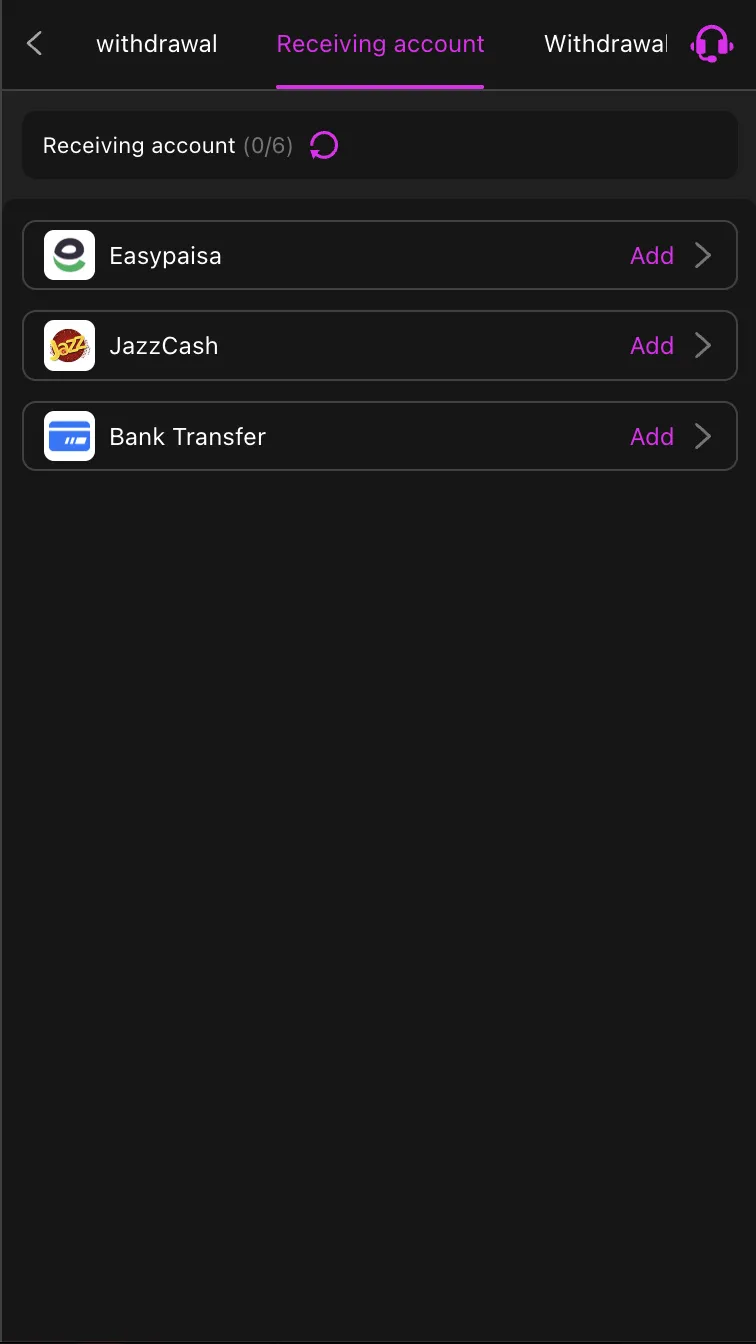
Critical: The name you enter must match your EasyPaisa or JazzCash account name exactly. A mismatch between your G555 withdrawal name and your mobile wallet registration is one of the most common reasons withdrawals are held for manual review.
Step 2 - Process a Withdrawal
Once your receiving account is saved:
- Open G555 → Wallet → Withdrawal → Withdrawal (the second tab)
- Select your linked receiving account (EasyPaisa or JazzCash)
- Enter the withdrawal amount - check the current minimum inside the app
- Enter your withdrawal password or confirm with your account PIN
- Submit the request
G555 processes standard withdrawal requests within minutes to a few hours for EasyPaisa and JazzCash. Bank Transfer takes longer - allow up to 24 hours.
Test Withdrawal - Do This First
Before depositing a significant amount, run a test cycle:
- Deposit the minimum (Rs 100)
- Immediately request a withdrawal of whatever amount G555 allows at minimum
- Monitor how long it takes and whether the funds arrive in your EasyPaisa or JazzCash wallet
- If the cashout processes correctly, the platform is working as expected for your account
- Subsequent deposits can be larger once the cashout process is confirmed
The test costs, at most, the difference between what you deposited and what came back (plus anything spent during gameplay). Finding a problem at Rs 100 is significantly better than finding it after a larger deposit.
Cashback Withdrawal Timing
G555's cashback runs on specific calendar dates - the 5th, 15th, and 25th of each month. If you have unclaimed cashback from a qualifying period, it is credited around these dates. Cashback credits may carry their own withdrawal conditions. Check the Promotions section for current cashback terms before requesting a withdrawal that includes cashback funds - mixing bonus funds with real-money balance can trigger wagering requirement holds.
Common Withdrawal Issues
Receiving account not set up: If the withdrawal screen shows no linked accounts, go to Receiving Account and add EasyPaisa or JazzCash before attempting a cashout. This is the most common issue for first-time G555 withdrawals.
Name mismatch rejected: The name on your G555 withdrawal account must match your EasyPaisa or JazzCash registered name exactly. If your wallet name uses a full name and G555 has a shortened version, update one to match the other. Contact support if the withdrawal is already held.
Minimum withdrawal not met: Check the current minimum withdrawal amount inside the app - this can change with platform updates. If your balance is below the minimum, you need to play or wait until more cashback credits before requesting.
Wagering requirement active: If you have claimed a bonus, your balance may have a wagering hold on the bonus portion. The balance shown in your wallet may not be fully withdrawable. Check the Promotions or Bonus section for active wagering obligations.
Withdrawal held for over 24 hours: Contact G555 support via in-app chat. Provide your withdrawal request ID, the amount, the receiving account details, and the request time. Do not submit a second withdrawal request for the same amount until the first is resolved.
Before Each Withdrawal
- Screenshot your balance before submitting - this is your record if the amount changes between submission and processing
- Confirm the receiving account is correct - the last-used account should appear by default, but verify before submitting especially if you have multiple accounts saved
- Do not withdraw while a bonus wagering requirement is active - withdrawing with an active wagering obligation typically forfeits the bonus
- Check for any pending cashback - if a cashback date (5th, 15th, 25th) is approaching, waiting a day may add to your withdrawable balance
Responsible Gambling
Withdrawing regularly is a sign of healthy gambling behaviour. If you have funds in your G555 balance that you are not actively using for gaming, withdraw them. Leaving a large balance in the app creates a lower barrier to losing it impulsively during an unplanned session.
Keep your gaming wallet balance low. Withdraw after sessions, not just after big wins. The withdrawal process on G555 is designed to be reversible - there is no penalty for taking money out and putting it back in a future session.
18+ only. This platform involves real financial risk.
For support with gambling-related concerns, visit Gambling Therapy.
For the full G555 review including payment safety assessment, read the G555 Full Review.
More G555 guides:
- G555 Deposit Guide
- G555 Registration Guide
- G555 Bonus Guide
- How to Play G555 Games
- G555 Referral Guide
- G555 Download Guide
Frequently Asked Questions
Do I need to set up a receiving account before my first withdrawal on G555?
Yes. G555 requires you to add at least one receiving account (EasyPaisa, JazzCash, or Bank Transfer) before a withdrawal can be submitted. Go to Wallet → Withdrawal → Receiving Account → Add to set this up. It takes two minutes and should be done before your first deposit, not after.
How many receiving accounts can I add on G555?
Up to 6. You can save multiple EasyPaisa, JazzCash, and Bank Transfer accounts and select which one receives each withdrawal. This is useful if you have wallets on different numbers or want to split withdrawals between accounts.
What is the minimum withdrawal on G555?
Check the current minimum inside the app under Wallet → Withdrawal - minimum amounts change with platform updates. The deposit minimum is Rs 100, and withdrawal minimums are typically in a similar range for this type of platform.
How long do G555 withdrawals take?
EasyPaisa and JazzCash withdrawals typically process within minutes to a few hours for standard requests. Bank Transfer takes longer - allow up to 24 hours. First withdrawals on new accounts may take additional time as G555 verifies the account details.
What happens to my bonus balance if I withdraw before meeting the wagering requirement?
On most APK gaming platforms, withdrawing before the wagering requirement is met results in the bonus portion of your balance being forfeited. Your deposited real money is generally returned, but the bonus funds are cancelled. Check the specific terms for any active bonus in G555's Promotions section before submitting a withdrawal.