

How to Register on G555 Game
Account setup & first login - Updated 2026
What You Need
Pakistani mobile number
Verification
OTP via SMS
Age Requirement
18+ only
⚠️ 18+ only. G555 is a real-money gambling platform. Only register if you are 18 or older and can afford to lose what you deposit.
G555 offers something that no other app reviewed on this site does: two separate registration paths. You can sign up with your Pakistani mobile number (choosing either password or OTP verification), or you can bind your existing Google account to register faster. The registration screen also gives you access to Demo mode before creating an account - worth using before deciding to sign up.
This guide covers both registration options, the mobile number format G555 expects, and what to set up before your first deposit.
What You Need
- A Pakistani mobile number - required for withdrawals even if you register via Google
- G555 APK installed - see the G555 Download Guide
- Google account (optional - if you want to use the Google sign-in path)
- 18 years or older
Try Demo Mode First
Before registering, G555 lets you access demo mode directly from the registration screen. Tap Demo at the bottom of the screen. You can browse the game library and try games without creating an account or depositing. Given that G555 includes Blockchain games that may be unfamiliar, spending 10 minutes in demo mode before registering is worth the time.
Option 1 - Register with Phone Number
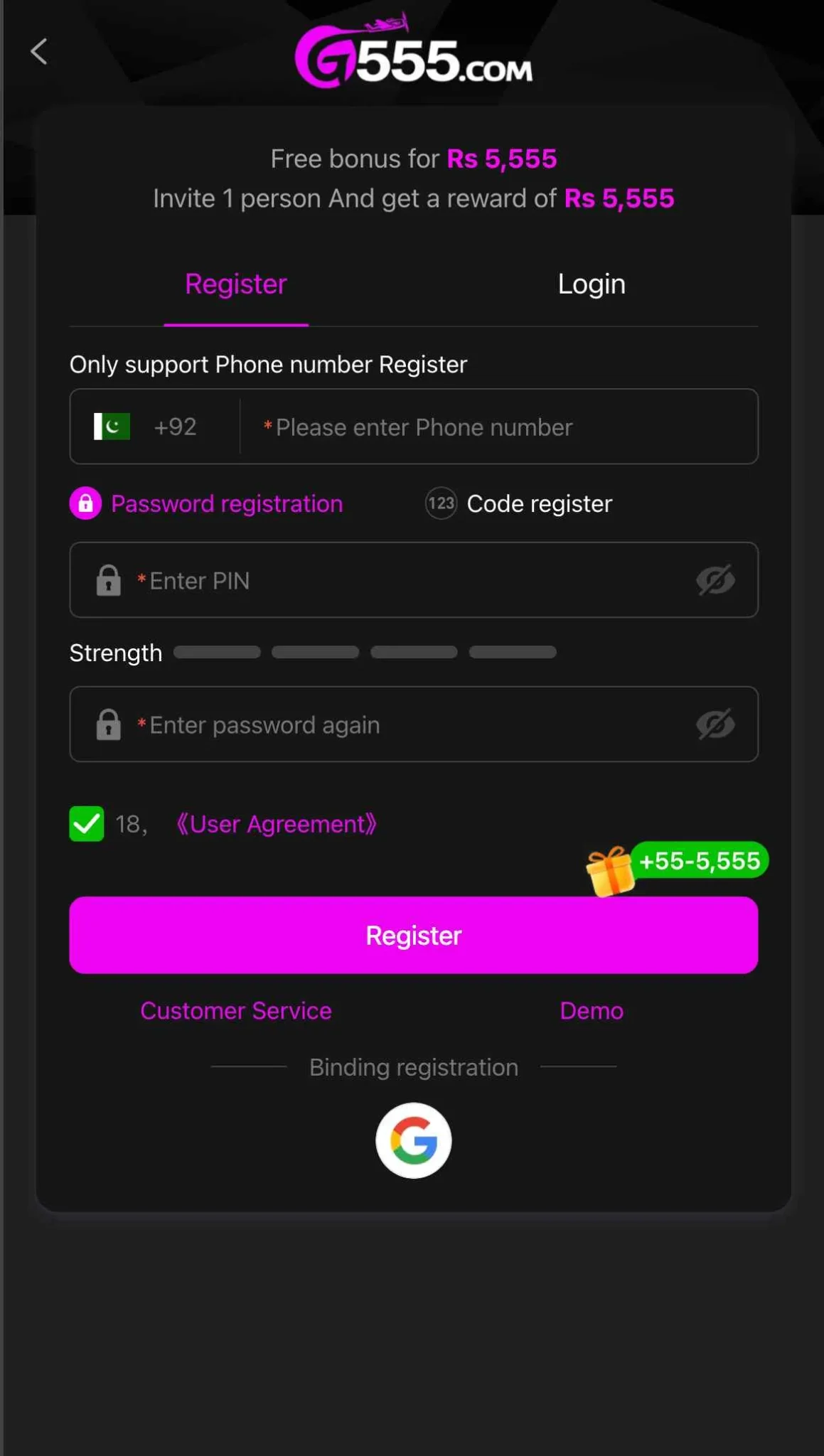
1. Open G555 and tap Register
The app opens to a Register/Login screen. Select the Register tab.
2. Enter your Pakistani mobile number correctly
G555 shows a +92 prefix with the Pakistani flag pre-filled in the number field. This means you enter your number without the leading 0:
- Your number is 0300-1234567 → enter 3001234567
- Your number is 0321-9876543 → enter 3219876543
- Your number is 0345-1112233 → enter 3451112233
Count your entry: it should be 10 digits, starting with 3. G555 displays "+92" before the field, making your full number +923001234567. Do not type "+92" yourself - only the 10 digits after it.
3. Choose your registration method
G555 gives you two options on the same form:
- Password registration - set a PIN, confirm it, done. No SMS required
- Code register - G555 sends a one-time SMS code to your number for verification
For Password registration: tap "Password registration" (highlighted in pink by default), enter your PIN in the Enter PIN field, confirm it in the second field, and observe the strength meter - aim for at least 3 bars.
For Code register: tap "Code register," enter your number, and wait for the SMS. Enter the code when it arrives.
4. Accept the User Agreement
Tick the checkbox next to 18, User Agreement. Registration will not proceed without this. The 18 is G555's age requirement - by ticking, you confirm you are at least 18 years old.
5. Tap Register
The pink Register button submits your details. G555 may display your registration bonus at this stage.
Option 2 - Register with Google Account
G555 includes a Google icon below the Register button - a binding registration option not found on other Pakistani APK gaming apps reviewed on this site.
- Tap the Google icon on the registration screen
- Select your Google account from the sign-in prompt
- G555 will create an account linked to your Google credentials
- You will still need to link a Pakistani mobile number for withdrawal purposes - the app will prompt you to add a phone number in your account settings before your first cashout is processed
The Google registration path is faster at sign-up, but the withdrawal requirement means having a Pakistani mobile number linked remains necessary regardless of which registration method you use.
Logging Into G555
After registering:
- Open G555
- Tap Login
- Enter your registered mobile number (without the leading 0, after the +92 field)
- Enter your password or OTP depending on which method you used
- Tap Login
Google users: tap the Google icon on the Login screen to sign in with your linked account. If your Google account session is active on the device, login is one tap.
Forgot your PIN? Use the account recovery option on the login screen - you'll need access to your registered mobile number for OTP verification.
After Registration - Before You Deposit
G555 shows a Rs 5,555 free bonus on the registration screen. Before counting this as available cash, check the in-app Promotions section for the wagering requirements attached to it. Bonus funds on platforms like G555 typically must be wagered a set number of times before they are withdrawable. If your plan is to make a test deposit and withdraw immediately to verify the platform, skip any welcome bonus activation for now.
Set up your withdrawal account first. Go to Wallet → Withdrawal → Receiving Account. Add your EasyPaisa or JazzCash account number before depositing. Finding that your withdrawal method is not linked is the most common reason test deposits cannot be cashed out quickly.
When ready to fund your account, see the G555 Deposit Guide for full EasyPaisa and JazzCash deposit steps including the +0.5% bonus that applies automatically to every transfer.
Registration Problems
Number already in use - Use the account recovery or Forgot Password option if this was a previous registration. Contact G555 support via in-app chat if you've never registered before and see this error.
OTP not arriving (Code register) - Check your number was entered correctly (10 digits, no leading 0, no +92). Switch to mobile data. Wait 90 seconds before requesting a resend. Jazz and Warid numbers typically receive OTPs faster on this platform than Telenor or Ufone.
PIN strength meter stays red - G555's strength meter requires a mix of letters and numbers. A numeric-only PIN may trigger this. Add at least one letter to the PIN to advance the strength indicator.
Google sign-in failing - Ensure Google Play Services is up to date on your device. On older Infinix devices, Google services may need updating via the Play Store before binding registration works. Alternatively, use the phone number registration path instead.
Responsible Gambling
G555's registration screen shows Rs 5,555 bonus and Rs 5,555 referral rewards as headline figures. These are promotional numbers - not guaranteed amounts and not free cash you can withdraw without meeting conditions. Registering is a two-minute process. What comes after - depositing real money - deserves more deliberate thought.
Decide your maximum deposit for the month before opening the deposit screen. Explore demo mode first. Start with Rs 100. Verify the cashout process before adding more funds.
18+ only. All games involve real financial risk.
For support with gambling-related concerns, visit Gambling Therapy.
For the full G555 review including honest safety rating, game analysis, and withdrawal assessment, read the G555 Full Review.
More G555 guides:
- G555 Download Guide
- G555 Deposit Guide
- G555 Withdrawal Guide
- G555 Bonus Guide
- How to Play G555 Games
- G555 Referral Guide
Frequently Asked Questions
Why does G555 show +92 on the registration screen?
G555 uses the international dialling format. The +92 prefix is Pakistan's country code, pre-filled automatically. You enter only the remaining digits of your number - without the leading 0. A 0300 number becomes 3001234567 in the field.
Can I register on G555 without a Pakistani mobile number?
You can register via Google account without entering a phone number at sign-up. However, you will need to link a Pakistani mobile number before processing any withdrawal. Having the number ready at registration is the cleaner path.
What is the Rs 5,555 shown on the registration screen?
G555 advertises a Rs 5,555 registration bonus as a promotional incentive. This figure is subject to terms and wagering requirements before any part of it becomes withdrawable. Check the current bonus conditions inside the app under Promotions before factoring this number into your budget.
Is the Google sign-in option safe to use?
Using Google sign-in binds your Google credentials to your G555 account. This is a standard OAuth implementation - G555 does not receive your Google password. However, it does link your Google identity to a gambling account. Consider whether that association is acceptable before using this option.
Can I change my registered mobile number after sign-up?
G555 does not advertise a self-service number change option. Since your mobile number is linked to your withdrawal accounts, contact in-app support if you need to update it.