

How to Deposit on G555 Game
EasyPaisa, JazzCash & more - Updated 2026
Payment Methods
JazzCash, EasyPaisa
Processing Time
Instant (most cases)
Start With
Minimum amount first
⚠️ Only deposit money you can afford to lose entirely. G555 is a real-money gambling platform. Deposits are not investments. 18+ only.
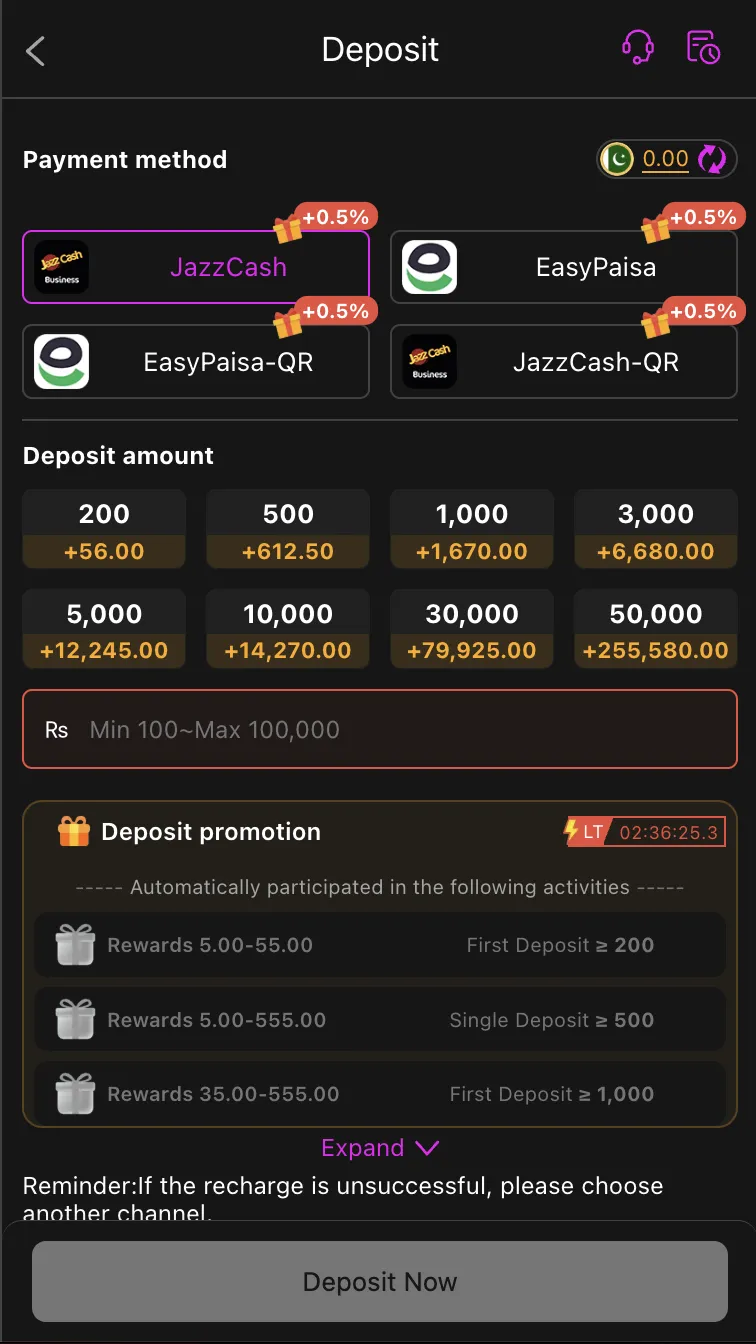
G555 has a deposit feature that no other app reviewed on this site offers: every deposit automatically receives a +0.5% bonus - no code, no first-deposit-only restriction, no minimum threshold. Deposit Rs 1,000 and Rs 1,005 lands in your account. It is a small edge that accumulates over time and costs nothing to receive. This guide covers the full deposit process for all supported methods, including the QR code option which G555 carries alongside standard transfers.
Supported Deposit Methods
| Method | Processing Speed | Bonus | Notes |
|---|---|---|---|
| JazzCash | Within minutes | +0.5% | Standard transfer via JazzCash app or *786# |
| EasyPaisa | Within minutes | +0.5% | Standard transfer via EasyPaisa app or *786# |
| JazzCash-QR | Within minutes | +0.5% | Scan QR code shown in-app using JazzCash app |
| EasyPaisa-QR | Within minutes | +0.5% | Scan QR code shown in-app using EasyPaisa app |
The +0.5% bonus applies to all four methods equally. QR code payments reduce the chance of a transfer error since you scan the payment details rather than entering them manually.
Minimum and Maximum Deposit
- Minimum: Rs. 100 PKR
- Maximum: Rs. 100,000 PKR per transaction
G555's deposit screen shows preset amounts - Rs 200, 500, 1,000, 3,000, 5,000, 10,000, 30,000, 50,000 - with the +0.5% bonus amount displayed next to each so you can see exactly what you'll receive before confirming. You can also type a custom amount within the Rs 100–100,000 range.
How to Deposit via JazzCash (Standard)
- Open G555 and go to Wallet → Deposit
- Select JazzCash
- Enter the deposit amount (minimum Rs 100) or choose a preset
- Note the JazzCash account number shown on screen - this is the receiving account
- Open the JazzCash app (or dial *786#) on your phone
- Go to Send Money → enter the G555 JazzCash number and your deposit amount
- Confirm the transaction and screenshot the transaction ID
- Return to G555 - your balance should update within a few minutes
- If the balance hasn't updated after 5 minutes, enter the transaction reference number in the deposit screen
How to Deposit via EasyPaisa (Standard)
- Open G555 → Wallet → Deposit → EasyPaisa
- Enter the deposit amount
- Note the EasyPaisa account number displayed in-app
- Open the EasyPaisa app (or dial *786#) → Send Money → enter the G555 number
- Complete the transfer and screenshot your confirmation
- Return to G555 - balance updates typically within minutes
- If not updated after 5 minutes, submit the transaction ID in the deposit screen
How to Deposit via QR Code
QR code deposits remove the manual number entry step, which eliminates the most common deposit error (entering the wrong account number):
JazzCash-QR:
- Open G555 → Wallet → Deposit → JazzCash-QR
- A QR code appears on screen
- Open the JazzCash app → go to Scan QR or Pay via QR
- Scan the code shown in G555
- The payment details fill automatically - confirm the amount and complete the transfer
- Screenshot your JazzCash confirmation
- Return to G555 - balance updates within minutes
EasyPaisa-QR: Same process - select EasyPaisa-QR in G555, scan with the EasyPaisa app's QR scanner, confirm payment, return to G555.
QR codes expire after a set time. If the code disappears before you scan it, go back and refresh the deposit screen to generate a new one.
The +0.5% Deposit Bonus - What It Actually Means
Every time you deposit on G555, 0.5% of your deposit amount is added to your balance automatically. Here is what that looks like at different amounts:
| Deposit Amount | Bonus Added | Total Received |
|---|---|---|
| Rs 100 | Rs 0.50 | Rs 100.50 |
| Rs 500 | Rs 2.50 | Rs 502.50 |
| Rs 1,000 | Rs 5.00 | Rs 1,005.00 |
| Rs 5,000 | Rs 25.00 | Rs 5,025.00 |
| Rs 10,000 | Rs 50.00 | Rs 10,050.00 |
The bonus is small on any individual deposit. Across regular deposits over time, it adds up without requiring any action from you. Before treating the bonus amount as withdrawable cash, check whether G555's terms classify it as a bonus with wagering requirements or as a straightforward balance top-up. Check the current terms in-app under Promotions.
Running a Test Deposit
Before committing to a full session deposit, run a test cycle:
- Deposit the minimum - Rs 100
- Go to Wallet → Withdrawal and request a cashout of whatever amount you can (see the G555 Withdrawal Guide for minimum withdrawal)
- If the withdrawal processes within the stated timeframe, G555's payment system is working correctly for your account
- Only increase your deposit after a successful cashout confirms the process works
This takes under an hour and costs at most the difference between what you put in and what you got back.
Deposit Safety Rules
- Only use the payment details shown inside the official G555 app - never transfer to a number sent via WhatsApp, Telegram, or any external message claiming to be G555 support
- Screenshot every transaction confirmation before closing your payment app - this is your evidence if a deposit doesn't credit
- Never share your OTP with anyone claiming to be G555 support
- Do not deposit from the same wallet you use for rent or groceries - use a dedicated EasyPaisa or JazzCash account for gaming
Deposit Not Showing in G555?
Work through these steps before contacting support:
Transaction ID not submitted: Standard JazzCash and EasyPaisa transfers may require you to enter the transaction reference number in the G555 deposit screen. Check for a "submit transaction ID" field - if it's there, enter the ID from your payment app confirmation.
Wrong account number used: If you transferred to a number other than the one shown in the G555 deposit screen, contact support with your transaction ID and screenshot immediately.
QR code expiry: If you paid against a QR code that expired before scanning, contact support with your transaction ID. The payment may have gone through but the deposit won't auto-credit.
Peak period delays: EasyPaisa and JazzCash processing can slow between 7pm and 11pm, particularly during PSL match evenings. A deposit that usually credits in 2 minutes may take 15–20 minutes during peak hours.
Still not credited after 24 hours: Contact G555 support through in-app chat. Provide your transaction ID, payment method, amount, time, and a screenshot of your confirmation. Do not make a second deposit until the first one is resolved.
Deposit Promotions Beyond the +0.5%
G555 runs additional deposit-linked promotions:
- First Deposit ≥ Rs 200: Rewards 5.00–55.00 (bonus amount on qualifying first deposit)
- Single Deposit ≥ Rs 500: Rewards 5.00–555.00
- First Deposit ≥ Rs 1,000: Rewards 35.00–555.00
These promotional rewards are shown on the deposit screen with a timer. Read the terms before activating - these bonuses typically carry wagering requirements before the reward amount can be withdrawn.
Responsible Gambling
Every deposit on G555 is money at risk. The +0.5% bonus, deposit promotions, and mission rewards are real features - they do not change the mathematical advantage the platform holds across all games.
Before depositing each session:
- Decide the maximum you're willing to lose for that session, not after you see the lobby
- Never chase a previous session's losses with a larger deposit
- Use the deposit minimum (Rs 100) for any new platform until withdrawals are verified
- Keep gaming funds in a dedicated wallet separate from your daily expenses
18+ only. Real money is at stake in every game.
For the full G555 review and honest risk assessment, read the G555 Full Review.
More G555 guides:
- G555 Withdrawal Guide
- G555 Registration Guide
- G555 Bonus Guide
- How to Play G555 Games
- G555 Referral Guide
- G555 Download Guide
Frequently Asked Questions
Does every deposit on G555 get the +0.5% bonus?
Yes. The +0.5% bonus applies automatically to all deposits - JazzCash, EasyPaisa, and QR code methods - with no code required and no minimum beyond the Rs 100 standard minimum. Whether the bonus amount itself has wagering requirements should be verified under Promotions in the app.
What is the minimum deposit on G555?
Rs 100 PKR. This is the standard minimum and the recommended starting amount for any new account. G555 also shows preset quick-deposit amounts starting at Rs 200, but the field accepts any amount from Rs 100.
Is QR code deposit faster than standard JazzCash or EasyPaisa transfer?
Processing speed is similar. The advantage of QR code is accuracy - you scan rather than type the account number, eliminating the most common deposit error. If your payment app supports QR scanning, it is the safer option.
What should I do if my deposit doesn't show after 20 minutes?
First check if there's a transaction ID field in the G555 deposit screen - manual deposits often require you to submit the reference number. If you've submitted it or there's no field, and the balance still hasn't updated after 60 minutes, contact G555 in-app support with your transaction ID and payment screenshot.
Can I deposit more than once per day?
Yes. G555 accepts multiple deposits per day up to the Rs 100,000 maximum per transaction. Each deposit receives the +0.5% bonus independently.