

How to Deposit on WC777 Game
EasyPaisa, JazzCash & more - Updated 2026
Payment Methods
EasyPaisa, JazzCash
Processing Time
Instant (most cases)
Start With
Minimum amount first
⚠️ Only deposit money you can afford to lose entirely. WC777 is a real-money gambling platform. Deposits are not investments. 18+ only.
WC777 sets its minimum deposit at Rs. 100 PKR - the same as its minimum withdrawal, and the lowest entry point of any app on this site. This means you can run a genuine test cycle - deposit, play a small amount, withdraw - without committing a significant sum to an unverified platform. This guide covers how to deposit through each supported payment method, what to check before your first transfer, and what to do if a deposit does not credit.
Supported Payment Methods
| Method | Processing Speed | Notes |
|---|---|---|
| EasyPaisa | Within minutes | Most widely used in Pakistan, recommended first |
| JazzCash | Within minutes | Fully supported, widely available |
| Bank Transfer | Several hours | For larger deposits exceeding mobile wallet limits |
WC777 does not support NayaPay. If NayaPay is your primary wallet, ZC777 is the only app on this site that accepts it alongside EasyPaisa and JazzCash.
Before Your First Deposit
Do these four things before transferring any money:
- Complete OTP verification at registration - unverified accounts can have withdrawal requests blocked regardless of balance
- Set your transaction password - WC777 requires a separate transaction password to process withdrawals. Set it during registration or in account settings before depositing. Users who skip this step discover the problem at withdrawal, not at deposit
- Skip the welcome bonus if testing the platform - wagering requirements lock your balance until a playthrough target is met. If your plan is to deposit Rs. 100 and withdraw to verify the platform, activate the bonus only on a later, larger deposit once you have confirmed cashouts work
- Use a dedicated wallet - link a separate EasyPaisa or JazzCash account to WC777, not the wallet you use for rent, groceries, or regular transfers
How to Deposit via EasyPaisa
Standard in-app deposit:
- Open WC777 and log in
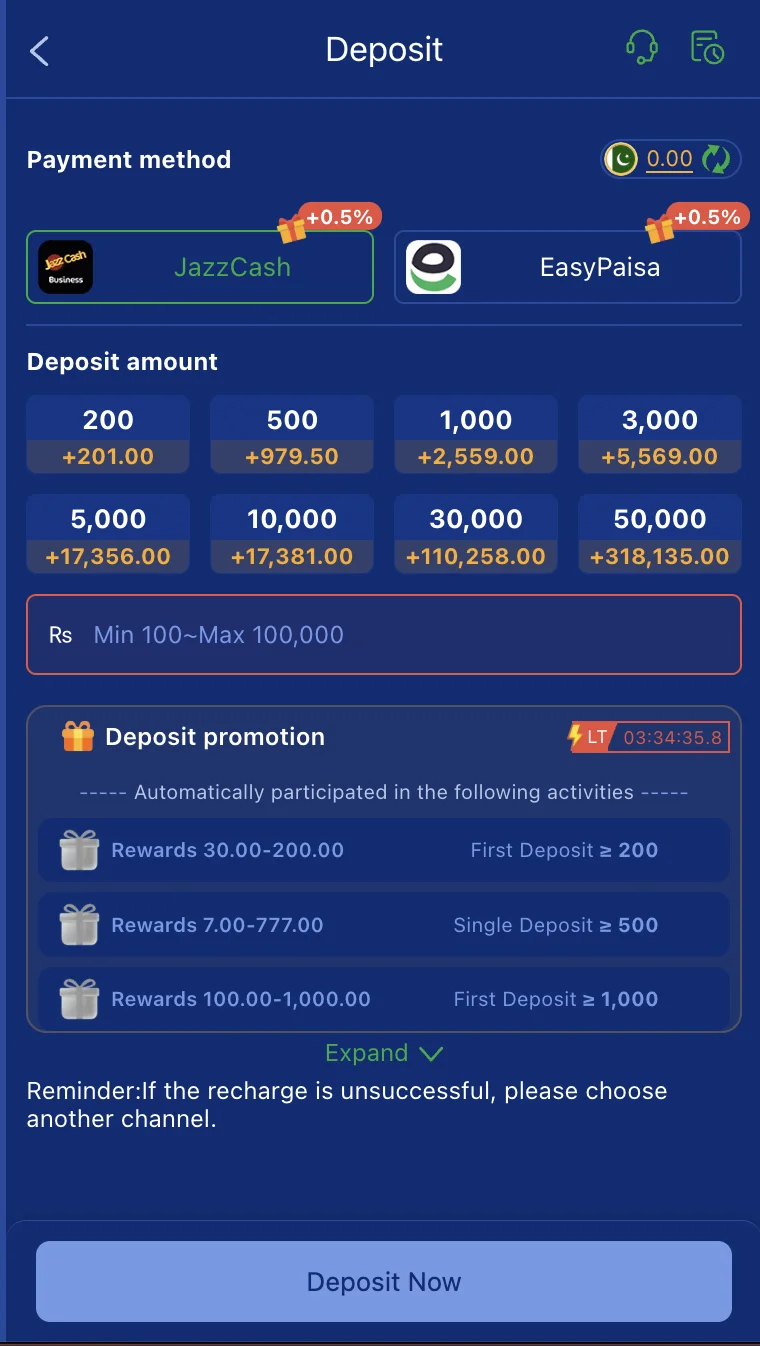
- Tap Wallet → Deposit
- Select EasyPaisa
- Enter the deposit amount (minimum Rs. 100)
- Follow the redirect to complete payment via the EasyPaisa app or dial *786#
- Return to WC777 - your balance updates within a few minutes
Manual transfer (if in-app redirect is unavailable):
- Note the EasyPaisa account number displayed on the WC777 deposit screen
- Open EasyPaisa or dial *786# → Send Money
- Enter the WC777 EasyPaisa number and your deposit amount
- Screenshot your transaction ID and confirmation before closing EasyPaisa
- Return to WC777 and enter the transaction reference ID if the deposit has not auto-credited within 5 minutes
How to Deposit via JazzCash
- Open WC777 → Wallet → Deposit → JazzCash
- Enter the deposit amount
- Follow the in-app redirect to complete payment via the JazzCash app or dial *786#
- For manual transfer: open JazzCash or dial *786# → Send Money → enter the WC777 JazzCash number → screenshot your transaction ID → submit the reference in-app
How to Deposit via Bank Transfer
Bank transfer is designed for larger deposits that exceed EasyPaisa and JazzCash daily wallet limits.
- Open WC777 → Wallet → Deposit → Bank Transfer
- Note the bank account details shown - account number, IBAN, and bank name
- Transfer via your bank app, Internet banking, or ATM
- Screenshot the bank transfer confirmation immediately - this is your proof of payment
- Return to WC777 and submit the transaction reference number
- Allow several hours for processing - bank transfers are not instant
For deposits under Rs. 25,000, EasyPaisa or JazzCash is faster and simpler. Bank transfer is primarily useful when you are depositing amounts your mobile wallet cannot handle in a single transaction.
The Rs. 100 Test Deposit Strategy
WC777's Rs. 100 minimum on both deposit and withdrawal enables a sensible approach to any new platform:
- Deposit Rs. 100 - the minimum
- Play a small amount or check your balance
- Immediately request a withdrawal of the remaining balance back to EasyPaisa or JazzCash
- If the withdrawal processes correctly, the platform is working as expected for your account
- Now you can make your actual session deposit knowing the cashout process is confirmed
This takes under 15 minutes and costs the difference between what you deposited and what came back - potentially nothing if you did not play. No other app on this site makes this test easier at Rs. 100.
Deposit Safety Rules
These apply to every deposit you make on WC777, not just the first:
- Only use payment numbers displayed inside the official WC777 app - not numbers shared via WhatsApp groups, Telegram, or any external source. WC777 support will never send you a private payment number to use instead of the one in the app
- Screenshot every payment confirmation immediately after completing a transfer. This is your evidence in any dispute
- Never share your OTP or transaction password with anyone claiming to be WC777 support
- Never send a deposit as a "test" to an account that contacts you claiming to be WC777 - legitimate platforms do not ask users to send money to support reps
Deposit Not Showing in WC777?
Work through this list before contacting support:
Transaction ID not submitted: Manual deposits via EasyPaisa or JazzCash require you to enter the transaction reference in-app to credit your account. Check the deposit screen - if there is a "submit transaction ID" field, enter the ID from your payment confirmation.
Wrong payment number used: If you transferred to a number other than the one shown in the WC777 deposit screen, the funds will not auto-credit. Contact support with your transaction ID and screenshot.
Bank transfer processing time: Bank transfers take several hours, not minutes. Check again after 4–6 hours before raising a dispute.
Peak period delay: EasyPaisa and JazzCash processing can slow between 7pm and 10pm, particularly on weekends and PSL match evenings when platform traffic is high. A deposit that typically credits in 2 minutes may take 15–20 minutes during peak hours.
If your deposit has not appeared after 24 hours: Contact WC777 support through in-app chat or the official WhatsApp/Telegram channel. Provide your transaction ID, payment method, amount, date and time, and a screenshot of your payment confirmation. Do not attempt to deposit again until the first one has been resolved.
Deposit Limits
WC777 accepts deposits from Rs. 100 up to Rs. 50,000 per transaction. Individual mobile wallet limits (EasyPaisa and JazzCash) apply and are set by those platforms, not by WC777. If you need to deposit above your daily wallet limit, use Bank Transfer.
Responsible Gambling – Before You Deposit
Deposits are the most consequential action you take on WC777. Before every deposit - not just the first:
- Decide your maximum deposit for the session before opening the app. This number does not change once you are inside the game lobby
- Never deposit to recover losses from a previous session - this is how small losses become large ones
- The Rs. 100 minimum is also your test threshold - if you are unsure whether to trust a new platform, Rs. 100 is the right amount to start with, not your full session budget
- Keep your gaming wallet balance low - withdraw regularly rather than letting large balances accumulate inside the app
This platform is strictly for users aged 18 and above.
For the full platform review including safety rating, game breakdown, and honest risk assessment, read the WC777 Full Review.
More WC777 guides:
- WC777 Download Guide
- WC777 Withdrawal Guide
- WC777 Bonus Guide
- How to Play WC777 Games
- WC777 Referral Guide
Author Bio: Written by the BYT Editorial Team - payment and deposit specialists covering APK gaming platforms for Pakistani users. We are not affiliated with WC777.
Disclaimer: 18+ only. Deposits on WC777 are used for real-money gambling. Earnings are not guaranteed. Never deposit more than you can afford to lose.