

How to Withdraw from WC777 Game
EasyPaisa & JazzCash - Updated 2026
Processing Time
1–24 hours
Min. Withdrawal
Rs. 100
Methods
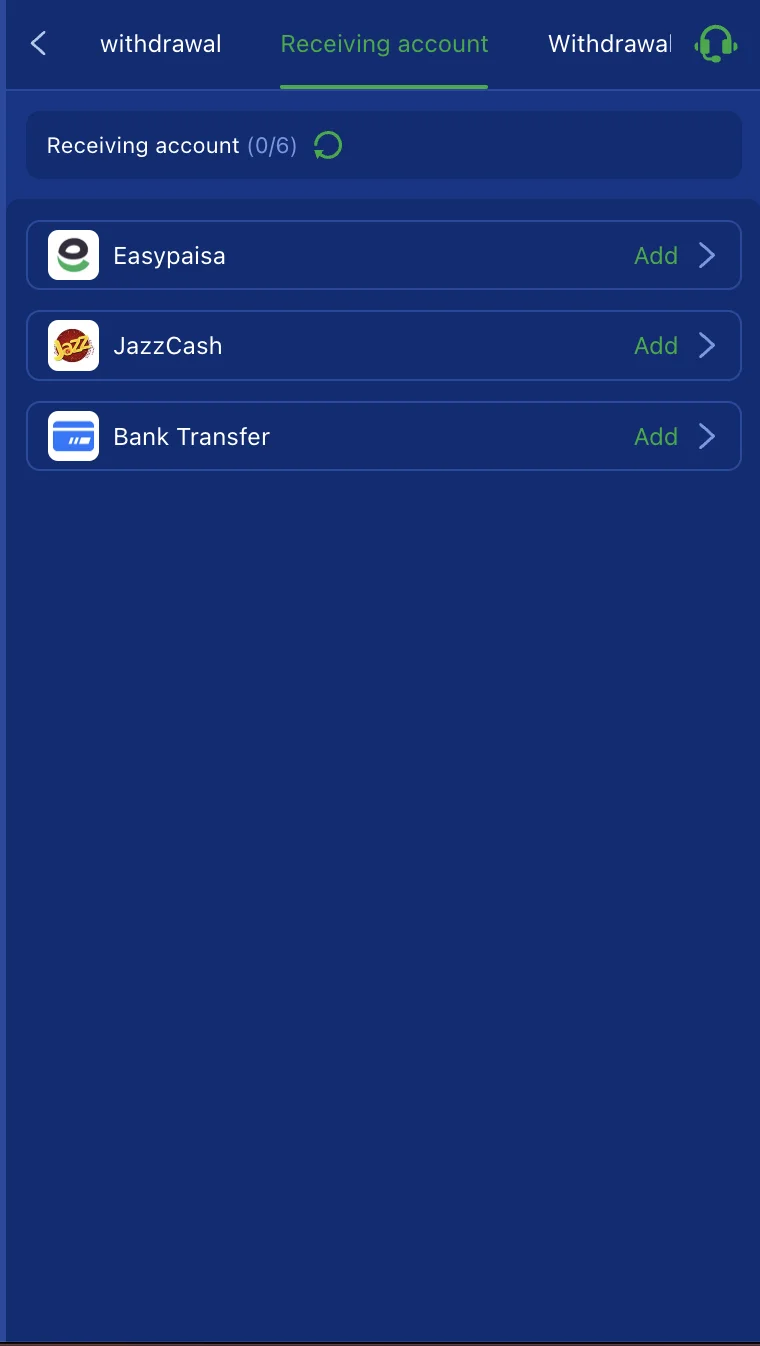
EasyPaisa, JazzCash
Earnings are not guaranteed. Withdrawals are only possible from real-money balances that meet the Rs. 100 minimum. Bonus funds require wagering completion before withdrawal. 18+ only.
This guide covers everything you need to know about withdrawing from WC777 - supported methods, exact steps for each, what the transaction password is and why you need to set it before your first cashout, typical processing times, and how to fix every common withdrawal problem.
Why the Rs. 100 Minimum Matters
WC777's minimum withdrawal of Rs. 100 PKR is the lowest of any app reviewed on this site. This is not a marketing detail - it has a practical use.
On any gaming platform you have not used before, the safest first action is to deposit the minimum, then immediately request a withdrawal before playing. If the withdrawal processes correctly, you have confirmed the platform works for your account. If it does not, you have lost Rs. 100 at most.
WC777's Rs. 100 minimum makes this test genuinely low-cost. Use it.
Supported Withdrawal Methods
| Method | Speed (Claimed) | Notes |
|---|---|---|
| EasyPaisa | 2–5 minutes | Most widely used, recommended first |
| JazzCash | 2–5 minutes | Equally supported |
| Bank Transfer | Several hours | For larger amounts; slower than mobile wallets |
WC777 does not support NayaPay withdrawals. If NayaPay is your primary wallet, ZC777 is one of the few Pakistani gaming apps that supports it.
The Transaction Password – Set This Before You Try to Withdraw
WC777 requires a transaction password to process withdrawals. This is a separate credential from your login password - set specifically to authorise cashout requests.
Where to set it: During registration, or in Account Settings → Security → Transaction Password after registration.
If you skipped it during registration, set it now before your first withdrawal request. Users who discover they have not set a transaction password mid-withdrawal face a delay while the account settings are updated. The process is straightforward - but better done before you need it.
The transaction password should be different from your login password. Do not use your phone number or date of birth.
Before You Withdraw – Checklist
Run through this before submitting any withdrawal request:
- Your balance is real-money balance, not bonus balance - bonus funds require wagering completion first
- The withdrawal amount is at or above Rs. 100
- Your transaction password is set in account settings
- Your EasyPaisa or JazzCash number matches the number registered on your WC777 account exactly - same digits, no spaces or formatting differences
- Your name in the withdrawal form matches the name on your mobile wallet exactly
- Any active bonus wagering requirements have been met
- Your account OTP was verified at registration
- No active game rounds are running with unsettled stakes
Step-by-Step: How to Withdraw from WC777
Via EasyPaisa
- Open the WC777 app and log in
- Tap Wallet in the navigation
- Tap Withdraw
- Select EasyPaisa
- Enter your EasyPaisa mobile number - must match your WC777 account number exactly
- Enter your name as registered on your mobile wallet
- Enter the withdrawal amount (minimum Rs. 100)
- Enter your transaction password when prompted
- Review all details carefully
- Tap Confirm or Submit
- Claimed processing time is 2–5 minutes for standard requests
Via JazzCash
- Open WC777 → Wallet → Withdraw
- Select JazzCash
- Enter your JazzCash mobile number
- Enter your name as registered on your JazzCash wallet
- Enter the withdrawal amount
- Enter your transaction password
- Confirm and submit
Via Bank Transfer
- Open WC777 → Wallet → Withdraw → Bank Transfer
- Enter your bank account number and IBAN
- Ensure the account title matches your WC777 registration name exactly
- Enter the amount
- Enter your transaction password
- Submit the request
- Processing takes several hours depending on your bank
How Long Do WC777 Withdrawals Take?
| Situation | Expected Time |
|---|---|
| Standard EasyPaisa or JazzCash | 2–5 minutes |
| First withdrawal (account verification) | Up to 24 hours |
| Peak periods - PSL evenings, weekends | 15–60 minutes |
| Bank Transfer | Several hours |
| Large amount requiring manual review | Up to 48 hours |
Your first withdrawal on WC777 will typically take longer than subsequent ones. The platform runs an initial check on new accounts before releasing the first cashout. This is normal across Pakistani APK gaming apps. Do not submit a second withdrawal request while the first is still in review.
Common Withdrawal Problems and How to Fix Them
Transaction Password Not Set
If you see a "transaction password required" error, go to Account Settings → Security → Transaction Password, set it, and resubmit your withdrawal request. This is the most common cause of withdrawal delays for new WC777 users.
Account Name Mismatch
The name you enter in the withdrawal form must match the account holder name on your EasyPaisa or JazzCash wallet exactly - same spelling, same format, no extra spaces. Even a minor difference can result in a hold or rejection.
Fix: Check the registered name on your mobile wallet app. If it does not match your WC777 account name, correct the discrepancy before submitting again.
Bonus Wagering Not Completed
If your wallet shows a balance but the withdrawal is blocked or the available amount is less than expected, you likely have active bonus funds with incomplete wagering requirements.
Fix: Check your active bonus status in the Promotions or Bonus section of the app. Bonus funds are locked until the wagering requirement is fully met. Do not submit withdrawal requests while active, unwagered bonus funds are present - the request will be blocked or the bonus will be forfeited.
Active Game Round
Funds committed to a running game round are not available for withdrawal until the round settles.
Fix: Allow any open rounds to complete, then check your withdrawable balance and try again.
First Withdrawal Delay
Your first withdrawal may take several hours rather than the standard 2–5 minutes. This is an account verification step, not a problem. Do not submit duplicate requests while the first is processing.
What Happens to a Rejected Withdrawal
A rejected withdrawal is typically returned to your WC777 wallet balance within a few hours. If the funds do not reappear within 4 hours, contact WC777 support via in-app chat, WhatsApp, or Telegram with your transaction details and screenshots.
Tips to Avoid Withdrawal Problems
- Set your transaction password during registration - not at the point of your first withdrawal request
- Use consistent details everywhere - register WC777 with the same mobile number linked to your EasyPaisa or JazzCash wallet, and use your wallet's registered name exactly in all withdrawal forms
- Screenshot before and after - screenshot your wallet balance before submitting a withdrawal, and screenshot the confirmation immediately after submitting
- Withdraw regularly - do not let large balances accumulate inside the app. Regular small withdrawals reduce your exposure if the platform experiences any issues
- Do not use a VPN - VPN usage can trigger payment processing flags and delay or block withdrawals
- Test with Rs. 100 first - confirm the process works on your specific account and wallet before making larger cashout requests
What to Do If Your Withdrawal Is Stuck
- Wait 15 minutes before treating it as a problem - even platforms claiming 2–5 minutes can take longer during peak hours
- Check your payment wallet directly - sometimes the money arrives without triggering an in-app notification, particularly if your wallet notification settings are off
- Contact WC777 support - available via in-app chat, WhatsApp, and Telegram. Provide your transaction ID, amount, date and time of request, and a screenshot of the pending status
- Do not submit duplicate requests - submitting the same withdrawal twice will flag both for manual review
- Document everything - record all support conversations with dates, times, and representative responses
Frequently Asked Questions
What is the minimum withdrawal amount on WC777?
Rs. 100 PKR - the lowest minimum withdrawal of any app on this site. This allows you to test the full cashout process with a very small amount before committing more funds.
Why does WC777 require a transaction password for withdrawals?
WC777 uses a separate transaction password as an additional security layer to protect your wallet from unauthorised cashout requests. It must be set in account settings before any withdrawal can be processed.
My withdrawable balance is less than my total wallet balance - why?
Your total balance includes bonus funds that have not yet met wagering requirements. Only real-money balance that has cleared any applicable wagering obligations is available for immediate withdrawal.
Does WC777 charge a withdrawal fee?
Check the in-app Wallet section for current fee information before submitting. Some platforms apply a small processing fee on withdrawals. Verify this directly in the app as terms can change.
Is there a maximum withdrawal limit on WC777?
WC777 may apply per-transaction or daily withdrawal limits. Current limits are shown in the Wallet section of the app. These can change without advance notice.
My withdrawal shows completed in-app but the money never arrived - what do I do?
Contact WC777 support immediately via in-app chat or WhatsApp. Provide your transaction ID, date and time, amount, and a screenshot of both the completed status in the app and your mobile wallet showing no matching incoming credit. This documentation is required to raise a formal dispute.