

KK Eagle Game APK Download
Latest Version 2026 - Free for Android
Platform
Android (APK)
Source
Official Website
File Size
~30–50 MB
⚠️ 18+ only. KK Eagle is APK-only - not on the Google Play Store. Only download from the official website. Earnings are not guaranteed.
KK Eagle is a free download for Android. The APK is around 45MB - on a Jazz 4G connection it takes about 30 seconds. On Telenor 3G expect 3–4 minutes. Because it bypasses the Play Store, you need to enable one Android setting before it will install. This guide walks through that step for every major phone brand in Pakistan, then covers registration and first steps after install.
System Requirements
| Requirement | Minimum |
|---|---|
| Android Version | 5.0 or higher |
| Free Storage | 60MB minimum (45MB APK + install space) |
| RAM | 1GB minimum, 2GB recommended for live casino games |
| Internet | Stable data or Wi-Fi |
| Payment Account | Pakistani mobile number for JazzCash or EasyPaisa |
KK Eagle runs on budget Infinix Hot, Tecno Spark, and entry-level Samsung devices without issues. The Aviator game and Rummy lobby both loaded smoothly in testing on a Tecno Spark 30 over Jazz 4G. Live casino games (Roulette, Baccarat) buffer on weak rural 3G connections - account for that before playing them.
iPhone users can access a browser version via the official website, but full functionality - slots, Aviator, Rummy - requires the Android APK.
Step 1 - Enable Install from Unknown Sources
This is the only non-standard step. Android blocks APKs from outside the Play Store by default. The setting location varies by phone brand.
Infinix Hot series (Android 11+):
- Go to Settings → Privacy and Security
- Tap Install Unknown Apps
- Find Chrome (or whichever browser you use) and toggle Allow to ON
Tecno Spark series:
- Go to Settings → Security
- Tap Install Unknown Apps
- Enable it for your browser
Samsung Galaxy (Android 8+):
- Go to Settings → Biometrics and Security
- Tap Install Unknown Apps
- Select your browser and enable it
Older Android (7 and below - common on Infinix Hot 4, older Tecno):
- Go to Settings → Security
- Toggle Unknown Sources to ON - this enables it globally rather than per-app
Turn Unknown Sources back off once the app is installed. Leaving it enabled permanently increases your device's exposure to malicious APKs from other sources.
Step 2 - Download the APK
Open your phone browser and go to the official KK Eagle website. The download button is on the homepage.
The file is ~45MB. Wait for the full download before tapping the file - a partial download installs a corrupt APK that will fail silently or crash immediately after launch.
Do not download from:
- WhatsApp or Telegram links - these are frequently modified versions designed to capture your JazzCash credentials
- Third-party APK hosting sites - there is no way to verify the file has not been altered
- Facebook groups claiming to share "the latest version"
The official website is the only safe source. That applies every time you update, not just the first install.
Step 3 - Install the APK
- Open File Manager → Downloads (in Chrome: tap the three-dot menu → Downloads)
- Tap the KK Eagle APK file
- Tap Install when prompted
- Android may show a Play Protect warning - this is standard for every non-Play Store APK, not specific to KK Eagle. Tap Install Anyway
- Tap Open when the installation finishes
The install takes about 10–15 seconds on most devices.
Step 4 - Register Your Account
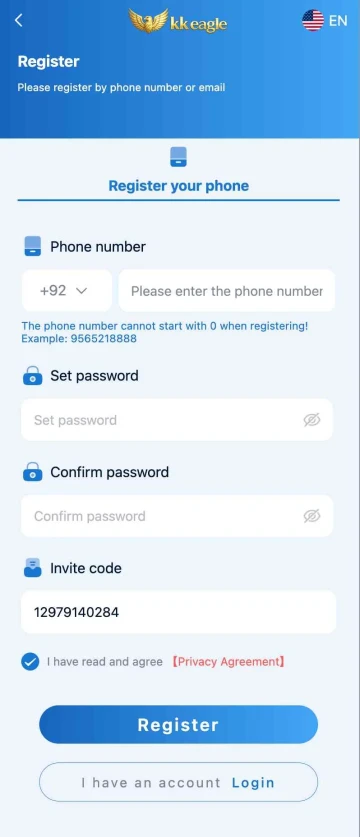
- Tap Register on the opening screen
- Select Register your phone
- Enter your Pakistani mobile number without the leading 0. The app shows +92 by default. Enter 9565218888, not 09565218888 - this is the most common registration error
- Set a password (mix of letters and numbers, minimum 8 characters) and confirm it
- Enter your invite code in the field provided - if you have one, this is the time to enter it. It cannot be added after registration completes
- Tick the Privacy Agreement checkbox
- Tap Register
Account setup takes under two minutes.
How to Update KK Eagle
KK Eagle does not update through the Play Store. To update:
- Visit the official KK Eagle website
- Download the new APK file
- Install it over the existing version - your account, balance, and Agency commission data are preserved
- Log in with your existing credentials
Check in-app notification banners periodically - update prompts appear there when a new version is released. Playing on an outdated version can cause deposit errors or game loading failures.
Is It Safe to Download?
Honestly: it carries more risk than a Play Store download, and less risk than downloading from an unofficial source. Here is what that looks like in practice.
What reduces the risk:
- Downloading only from the official KK Eagle website
- Using a JazzCash or EasyPaisa account that is separate from your main financial wallet - ideally on a secondary SIM used only for gaming
- Not saving your KK Eagle password on a shared device
- Keeping your phone's built-in antivirus active (Infinix and Tecno both include basic phone protection)
What increases the risk:
- Downloading the APK from any source other than the official website
- Depositing directly from your primary JazzCash account
- Using a shared or public phone to store login credentials
There is no way to make an APK completely risk-free. Keeping the financial exposure low - separate wallet, minimum test deposit - is the practical way to manage it.
Common Problems and Fixes
"App not installed" error A previous version of the app is conflicting. Uninstall the old version first, then install the new APK file.
Download stops mid-way Switch from mobile data to Wi-Fi. Clear your Chrome browser cache (three-dot menu → Settings → Privacy → Clear browsing data → Cached files) and re-download.
Play Protect warning This shows for every APK outside the Play Store. Tap Install Anyway. It is not specific to KK Eagle.
App crashes immediately after opening The download was likely interrupted. The file installed but is incomplete. Delete the APK, re-download from scratch, and reinstall.
Cannot find the file after download Open File Manager → Downloads. On older Infinix devices, this folder is sometimes named Internal Storage → Download (without the 's'). In Chrome, tap the three-dot menu → Downloads to locate it directly.
Phone number rejected at registration Remove the leading 0. Enter the number as 9XXXXXXXXX, not 09XXXXXXXXX. The +92 country code is already selected.
Login fails after install Use the Forgot Password option to reset. Make sure the number entered matches the one used at registration exactly.
After Installing - First Steps
- Deposit the minimum - Rs 300 - test the platform before committing more
- Request a withdrawal immediately - Rs 300 out, before playing anything. If it clears, the platform is functional. If it does not, you have lost Rs 300 learning that
- Browse the lobby before betting - look at Slots, Lottery, Casino, and Rummy without opening your wallet
- Set a session budget - decide your maximum spend before you open any game. Change it to a lower number if your first impression of Aviator is "this looks easy"
- Read the bonus terms - if the welcome offer is active, check the wagering requirement before depositing. See the KK Eagle Bonus Guide for what wagering means in plain terms
Frequently Asked Questions
Is KK Eagle free to download?
Yes. The APK download costs nothing. You only spend money when you choose to deposit.
Can I use KK Eagle on iPhone?
Not as a native app. A browser version may work on iOS, but the full game library - Aviator, all slots, Rummy - requires the Android APK.
Does KK Eagle work on older phones?
Yes. The 45MB file size is designed to run on budget Android phones. Tecno Spark 10, Infinix Hot 20, and equivalent devices handle it without problems. Live casino games stream less smoothly on weak data connections - use Wi-Fi for those.
Does installing an APK void my warranty?
No. Enabling Unknown Sources and installing third-party APKs does not affect your device warranty. Malware from an unsafe source can cause damage - which is why the official website is the only acceptable download location.
What version of KK Eagle is current?
V1.1 as of the time of writing. Download from the official KK Eagle website to get the most recent version.